
| 일 | 월 | 화 | 수 | 목 | 금 | 토 |
|---|---|---|---|---|---|---|
| 1 | 2 | 3 | 4 | |||
| 5 | 6 | 7 | 8 | 9 | 10 | 11 |
| 12 | 13 | 14 | 15 | 16 | 17 | 18 |
| 19 | 20 | 21 | 22 | 23 | 24 | 25 |
| 26 | 27 | 28 | 29 | 30 |
- 다음에 또 만나자
- 대학생
- 정보처리기사2022
- N-Queen
- 스프링 MVC
- 모바일 청첩장
- 얘들아 잘 지내니
- 교육봉사
- 플러터
- 생일축하해 나 자신
- FLUTTER
- 교수님 과제 이제 그만..
- 타입 스크립트
- 다들 안잊어서
- TypeScript
- 지독한 컨셉충
- 2022 정보처리기사
- 수제비 2022
- 아싸의 생일
- 리눅스 마스터 2급
- 재택치료
- 정보처리기사 2022
- 수제비2022 정리
- CRUDS
- 다행이야...ㅎ
- 자가격리
- 에러 핸들링
- pem키 분실
- 개강해짐
- 뽀모도로 타이머
- Today
- Total
Rei’s Tech diary
[GitScope] 파일 삭제 혹은 이동시, GitError: did not match any files 해결기 본문
[GitScope] 파일 삭제 혹은 이동시, GitError: did not match any files 해결기
Reiger 2025. 12. 3. 15:23📢 문제 발생 (ver.0.0.6)
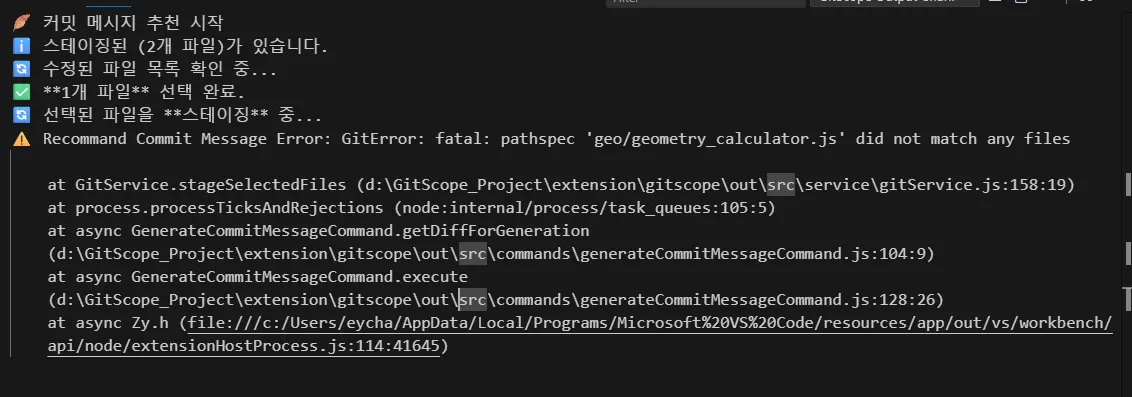
작업을 하다가 불필요한 파일을 삭제하거나, 리팩토링 시 파일을 다른 경로로 옮겼을때, 기존에 작업하던 파일이 없다는 "did not match any files" 오류가 발생하였다.
📢 문제 원인 분석
- getModifiedFiles() : 수정된 파일 목록 가져오기
- stageSelectedFiles() : 선택된 파일 목록 스테이징하기
우선, 수정된 파일 목록을 가져오는 getModifiedFiles()에서는 오류가 나지 않고, stageSelectedFiles()에서 파일들을 스테이징하는과정에서 오류가 발생하는 것을 확인하였다.
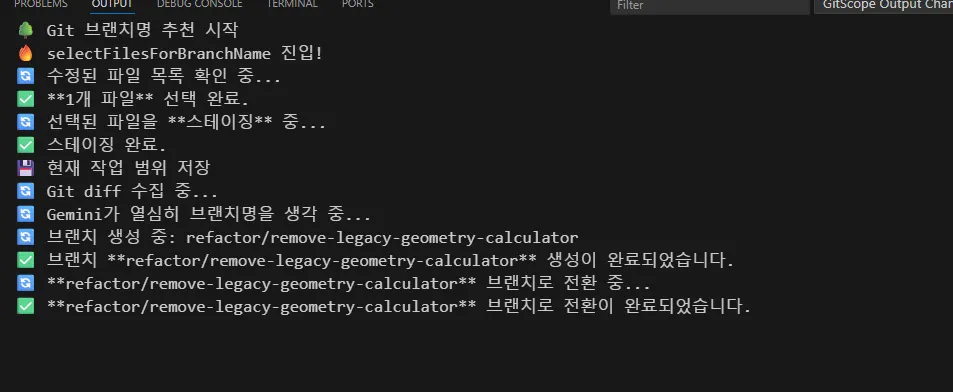
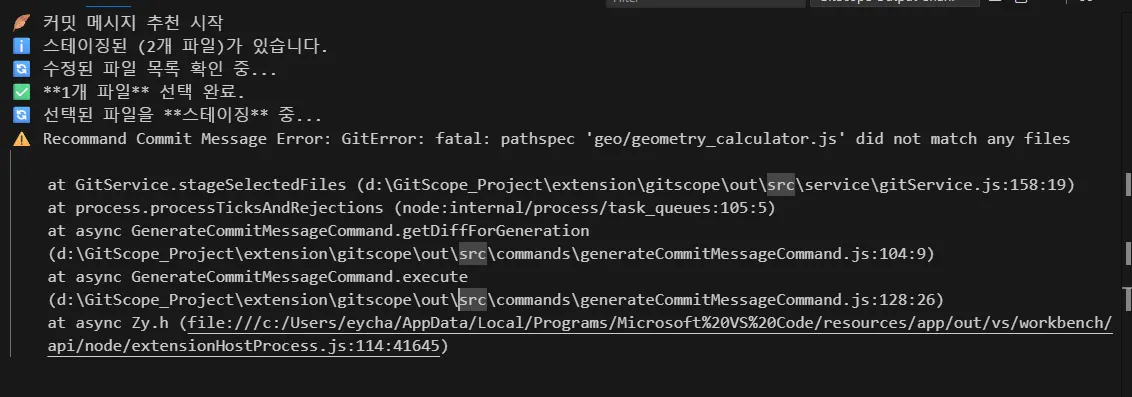
코드를 살펴보니,
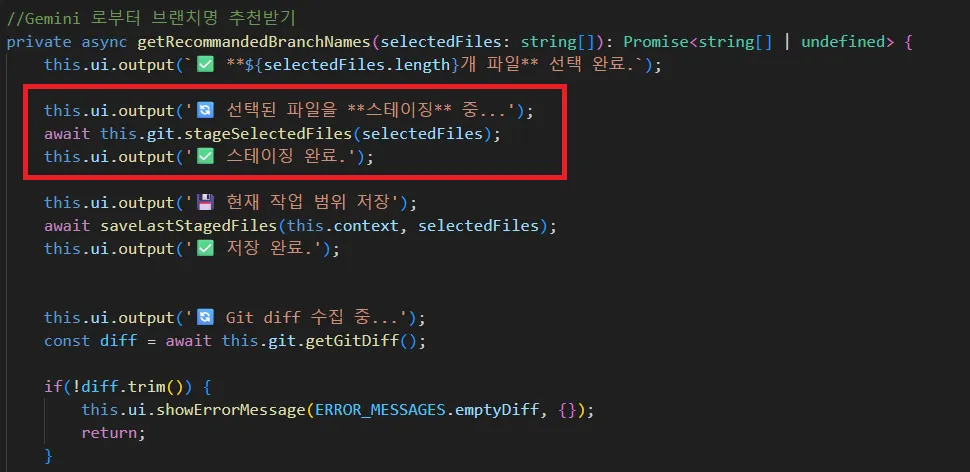
- 브랜치명 추천받을 때 스테이징 했던 파일을 커밋 메시지 추천 시 또 스테이징 하려고 하니까 발생한 문제였다.
- 이때 삭제된 파일들은 D로 이미 스테이징 되었는데, 커밋 메시지 생성시 또 다시 스테이징 하려고 하니 'did not match any files' 오류가 뜨는 것이었다.
💡 해결기 1 (ver.0.0.7) - 잘못된 사례
- delete된 파일과 renamed된 파일은 수정된 파일 목록을 가져올 때 표시하지 않고, commit시 따로 처리하고자 했다.
    /**
     * 수정한 파일 목록 가져오기
     * @returns string[]
     */
    async getModifiedFiles(): Promise<string[]> {
        try {
            const status = await this.git.status();
            const modifiedFiles: string[] = [];

            const relevantStatus = ['M', 'A', 'AM', 'MM', '??'];

            for(const file of status.files) {
                const isModifiedOrAdded = file.working_dir === 'M' || file.working_dir === 'A';
                const isStagedModifiedOrAdded = file.index === 'M' || file.index === 'A';
                const isDeleted = file.index === 'D' || file.working_dir === 'D';
                const isRenamed = file.index === 'R' || file.working_dir === 'R';

                if (!isDeleted && !isRenamed) {
                    if (isModifiedOrAdded || isStagedModifiedOrAdded || (file.index === '?' && file.working_dir === '?')) {
                        modifiedFiles.push(file.path);
                    }
                }
            }

        return modifiedFiles;

        } catch (error) {
            const errorMessage = error instanceof Error ? error.message : '알 수 없는 Git 오류';
            throw new GitError(errorMessage);
        }
    }


    /**
     * 스테이징된 파일 가져오기
     * @returns string[]
     */
    async getStagedFiles(): Promise<string[]> {
        try {
        const result = await this.git.diff(['--cached', '--name-only', '--diff-filter=ACMR']);

        const files = result
            .split('\n')
            .map(f => f.trim())
            .filter(f => f.length > 0)
            .filter(filePath => {
                const fullPath = path.join(this.rootPath, filePath);
                return fs.existsSync(fullPath);
            });

        return files;
        } catch (error) {
            const errorMessage = error instanceof Error ? error.message : '알 수 없는 Git 오류';
            throw new GitError(errorMessage);
        }
    }


    /**
     * 선택된 파일 Staging
     * @param files string[]
     */
    async stageSelectedFiles(files: string[]): Promise<void> {
        if(files.length === 0) {
            return;
        }
        const existingFiles = files.filter(filePath => {
            const fullPath = path.join(this.rootPath, filePath);
            return fs.existsSync(fullPath);
        });

        if(existingFiles.length === 0) {
            return;
        }

        try {
            await this.git.add(existingFiles);
        } catch (error) {
            const errorMessage = error instanceof Error ? error.message : '알 수 없는 Git 오류';
            throw new GitError(errorMessage);
        }
    }


     /**
     * Deleted, Renamed 상태의 파일 스테이징
     */
    async eunsureDRStaged(): Promise<void> {
        try {
            const status = await this.git.status();

            const drFilesToStage: string[] = status.files
                .filter(file =>
                    (file.working_dir === 'D' && file.index !== 'D') ||
                    (file.working_dir === 'R' && file.index !== 'R')
                )
                .map(file => file.path);

            if(drFilesToStage.length > 0) {
                await this.git.raw(['add', '--force', ...drFilesToStage]);
            }
        } catch (error) {
            const errorMessage = error instanceof Error ? error.message : '알 수 없는 Git 오류';
            throw new GitError(errorMessage);
        }
    }


    /**
     * Git Commit
     * @param message string
     */
    async commitChanges(message: string): Promise<void> {
        try {
            //커밋 전, Deleted, Renamed 상태의 파일 스테이징
            await this.eunsureDRStaged();
            await this.git.commit(message);
        } catch (error) {
            const errorMessage = error instanceof Error ? error.message : '알 수 없는 Git 오류';
            throw new GitError(errorMessage);
        }
    }
💡 잘못된 사례인 이유
- 사용자가 삭제된 파일을 다시 신경쓰지 않을것이라는 안일한 판단 아래 내린 결론이었지만, 잘못된 의사결정이었다.😅
- 삭제된 파일을 사용자가 알 수 없이 원격에 commit 하는건 굉장히 위험한 일이다. (암살시도급)
- 원격에서도 파일이 사라지는 일이기 때문에, 사용자가 직접 선택할 수 있게 해야한다.
- 이때, "삭제된 파일"임을 함께 표시하기 위해 getModifiedFiles() 함수도 함께 수정하기로 했다.
💡 해결 2 (ver.0.0.8)
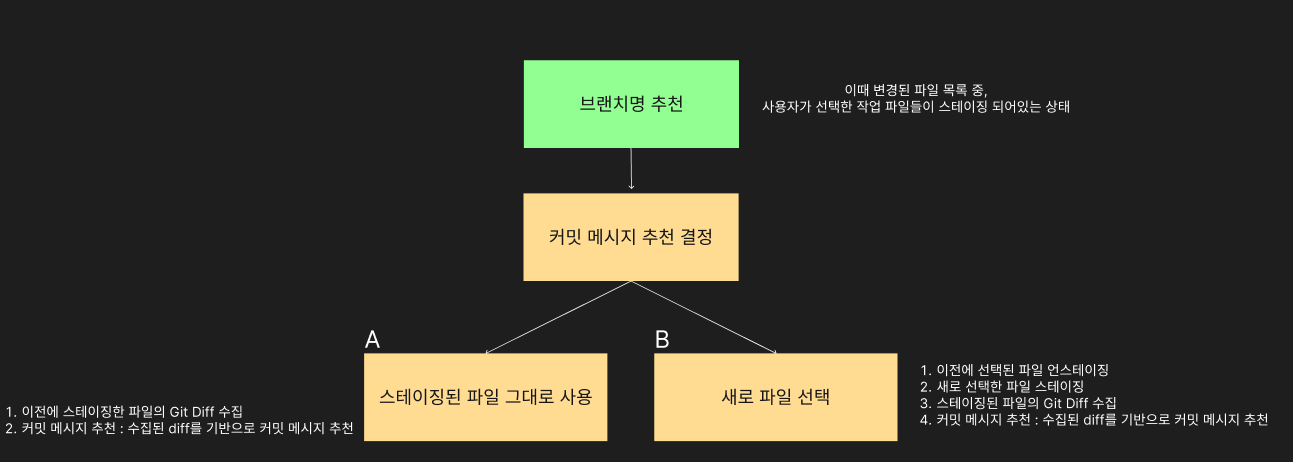
- 커밋 메시지 추천을 위해 파일을 처리하는 과정에서, 이전에 스테이징되었던 파일로 인한 중복 스테이징을 방지하도록 로직을 개선했다.
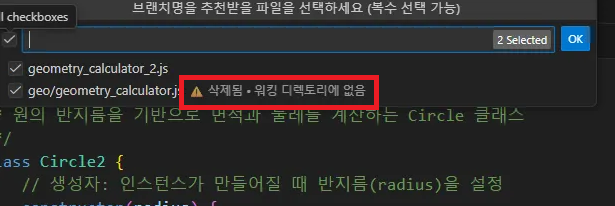
- getModifiedFiles() 함수를 수정하여, 파일 목록을 사용자에게 제시할 때 내용이 수정된 파일과 실제로 삭제된 파일을 명확하게 구분하여 표시하도록 개선했다.
async getModifiedFiles(): Promise<GitFileStatus[]> {
    try {
        const unstaged = await this.getUnstagedFiles();
        const staged = await this.getStagedFiles();

        const allModifiedMap = new Map<string, GitFileStatus>();

        //staged 파일을 먼저 추가한 후, unstaged파일로 덮어쓰기(가장 최신 상태 반영)
        staged.forEach(file => allModifiedMap.set(file.path, file));
        unstaged.forEach(file => allModifiedMap.set(file.path, file));

        return Array.from(allModifiedMap.values());

    } catch (error) {
        const errorMessage = error instanceof Error ? error.message : '알 수 없는 Git 오류';
        throw new GitError(errorMessage);
    }
}

//gitTypes.ts
export type GitFileStatus = {
    path: string;
    isDeleted: boolean;
}

//commands 파일
const modifiedFilesItems: ModifiedFileQuickPickItem[] = modifiedFiles.map(files => ({
    label: files.isDeleted ? `${files.path}`: files.path,
    description: files.isDeleted ? '⚠️ 수정 혹은 삭제됨 • 현재 디렉토리에 없음': '',
    isDeleted: files.isDeleted,
    path: files.path,
}));
✅ 결과
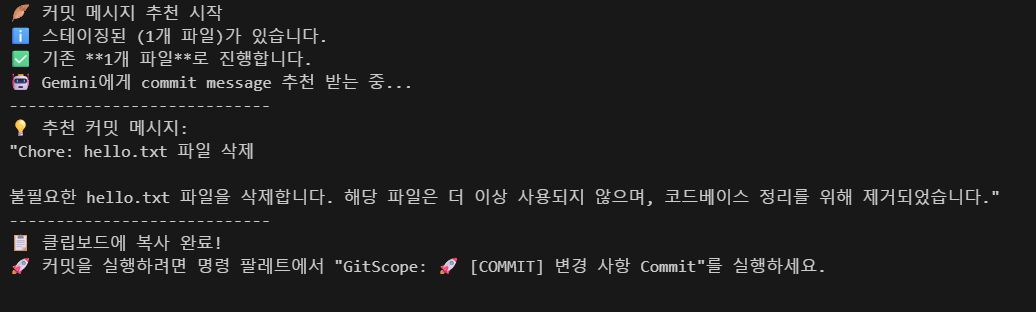
- 삭제된 파일도 정상적으로 commit message를 생성하는 것을 확인할 수 있었다.
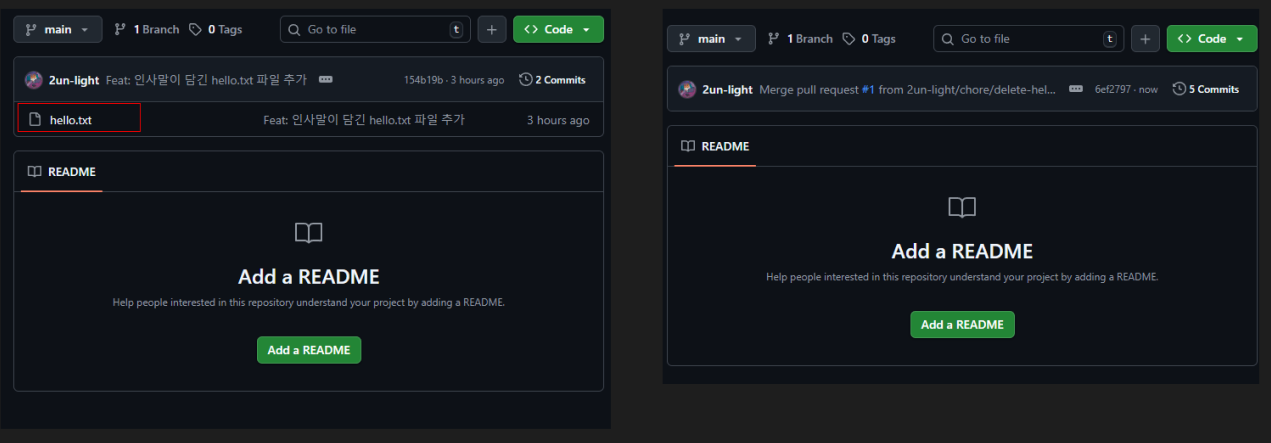
원격 저장소에서도 안전하게 삭제되는 것을 확인할 수 있다.
🌟 배운 점 및 마무리
1. Git 파일 상태 처리 이해
git의 D(Deleted) 상태에 대해 이해하게 되었다. 뿐만 아니라 M, A, R, C 등 Git 파일의 상태 코드에 대해 알게 되었다.
D 상태 자체가 단순히 파일이 삭제되어 없다는 것을 넘어, "스테이징 영역"에서 삭제 행위 자체가 기록된 상태임을 알게 되었다.
따라서 파일의 물리적 존재 유무와 Git의 논리적 추적 상태를 분리해서 처리해야함을 깨닫게 되었다.
2. UI/UX 설계의 중요성

기술적 구현뿐만 아니라, 사용자가 기대하는 워크플로우를 존중하는 설계의 중요성을 체감했다.
0.0.7버전에서 삭제된 파일을 사용자 모르게 자동 커밋 대상에 포함하려 했던 것은 지금 생각해도 아찔한 의사결정이었다.
반드시 사용자가 변경 사항을 인지하고 직접 커밋을 승인할 수 있도록 설계해야한다.
처음에 0.0.7버전 업데이트 하면서도 이게 맞는걸까 계속해서 고민했는데, 완성된 코드라도 끊임없이 의심하고 더 나은 해결책을 고심하는 태도가 중요하다는 것을 깨달았다.
앞으로도 의사결정에 있어서 더욱 더 신중해야겠다고 생각하게 되었다.
그럼 오늘의 일지 끝!

자세한 코드는 아래!
https://github.com/2un-light/gitscope-extension
GitHub - 2un-light/gitscope-extension
Contribute to 2un-light/gitscope-extension development by creating an account on GitHub.
github.com
'프로그래밍 > TroubleShooting' 카테고리의 다른 글
| [Simple-Git] binary 인식 문제 해결 (0) | 2025.11.09 |
|---|---|
| [Flutter] 회전 메타데이터 문제 해결 - Android에서 동영상이 이상하게 회전돼서 나올 때 (feat. FFmpeg) (0) | 2025.05.12 |
| [Flutter] 플러그인 NDK 버전 불일치 문제 해결 (13) | 2025.04.05 |
| 오버플로우 방지 중간값 계산 (overflow-safe midpoint calculation) (2) | 2025.01.14 |
| [Spring Boot] JWT Cannot pass null or empty values to constructor 문제 해결하기 (0) | 2024.04.22 |


